
An auditor asks for every AI system you run. You send the ones you know, the models with a budget, an owner and a project code. Then the auditor’s own sample turns up three more.
A vendor switched on an AI feature in your service desk tool. It now summarises customer tickets. A script in the finance team’s repository calls a model API on a cloud account nobody checks. A team has an agent in its sandbox that can already call internal tools.
Nobody hid them. Nobody thought to declare them. Each one handles data, and none has an owner on record.
Your one-page policy governs a list you don’t have. How do you find every AI system, and keep the list true?
The move
- Open the register. One entry per AI system you build, buy or use. The framework’s default test: it uses a trained or calibrated model to produce predictions, content, recommendations or decisions, and it supports operations, customers, decisions about people or reporting. Pilots that touch real data count. So do agents of every kind. A script with no model stays off the register until it calls one, or its rules came from one.
- Find what nobody declared. Search where AI leaves a trace, not only your teams’ memories.
- Make the register the gate. A system with no entry gets nothing it needs to run in production.
The guide’s call: the register is the gate. No entry, no production credential. The framework requires the entry before development begins (control RA-006). Holding back the credential turns that rule into a lock. Put the same check wherever a system goes live: the deployment pipeline for a self-hosted model, the admin switch for a material vendor feature, the tool grants for an agent. Break it only for a system already live when the register opens. Retroactive governance registers and tiers it, finds its gaps, and sets an interim mitigation for each until the evidence exists.
Pilots get no exception. What bends is how much the entry holds. At intake it needs an ID, a name, a purpose, owners and a status, with the tier pending until Step 4. A live pilot’s entry needs a tier, a deployed date and a next review date. Registering a system doesn’t approve it. Step 9’s gates do. When in doubt, the framework says, register.
Your call. Write down how many AI systems a full search would find in your organisation that are on no list today. Then write where your number came from.
How it works
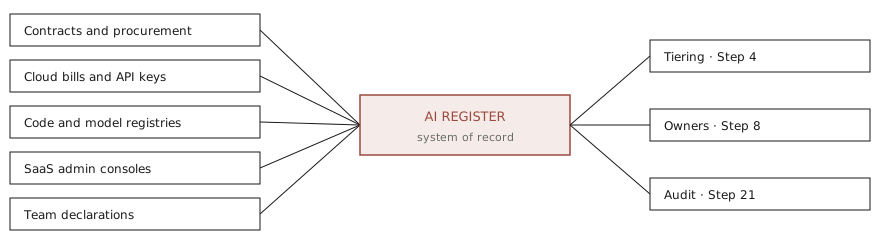
The five sources come from the framework’s inventory standard, grouped for this guide.
Contracts and procurement. Purchases from AI vendors, contracts with AI terms, and renewals where a vendor added AI features.
Cloud bills and API keys. Model APIs, managed ML platforms and GPU capacity, billed to any cloud account. The finance script shows up here.
Code and model registries. Repositories hold calls to model APIs and AI SDKs, model files and AI service keys. Your model registry, and model risk’s inventory if you keep one, show models with no entry. Here you find the sandbox agent.
SaaS admin consoles. AI features switched on in each tenant, and third-party apps with access to mail, files or chat. The ticket summariser is here.
Team declarations. The intake form, where new systems start, and the self-report route from Step 2. Here teams tell you what a system is for.
Two more feeds catch use that never reaches a contract or a cloud account: proxy logs and expense claims.
Match every item to an entry. Each one is a lead until you trace it to something running and a person who answers for it. Follow the finance script’s bill line to a cloud project, then to the repository and whoever commits to it. Someone takes ownership and registers it, or the key is revoked. Then match the other way. An entry in production with no spend, no traffic and no users may already be retired in practice. Record what you found, matched, registered and switched off, and what is still open.
On the right, the register feeds Step 4’s tiers, Step 8’s owners and Step 21’s answers to auditors and regulators. The framework makes it the single source for every portfolio number the board sees. Keep no second count.
Now look at your number. If it came from asking around, it counts only what people remember. Bills, consoles and code remember what people forget.
How it scales
Same fields, same gate. A bigger organisation adds feeds.
Small team
Keep the register as one YAML file in your repo, one entry per system, from the framework’s entry template. The team lead owns it. Changes go through review like code. Once a month, sweep your cloud accounts for model API keys, and the admin settings of every SaaS tool you pay for. Issue no model credential without an entry.
The file, the owner and the sweep are the guide’s recommendations. A file in version control meets the framework’s bar for a first register: every change has an author, and the history stays.
Enterprise
Hold the register in a system of record with access control and change history, such as your GRC platform. Feed it from procurement, billing, the model registry and the AI gateway, so discovery never waits for a sweep.
In the framework, AI Risk owns the register, issues IDs and checks it each quarter against what is running, reporting the result to the AI Risk Committee. Product owners create entries at intake. System owners keep them current in production. Add a steward in each business unit to chase gaps. The gateway feed and the stewards are the guide’s additions.
Starter kit
From the open AI governance framework, pinned at v2.2.0.
Deep dive
Shadow AI in network logs and expense claims
Someone installs a browser extension that summarises pages. Someone else buys a chatbot subscription on a corporate card. Proxy, secure web gateway, CASB and DNS logs show the traffic. Endpoint management shows desktop apps and extensions. Expense claims show subscriptions bought one seat at a time.
In the framework’s shadow AI detection, Security runs these feeds, and the finding sets the response. Confidential or personal data sent to an unapproved tool is an incident. An automation or agent built on one is stopped and registered, and goes through retroactive governance if it must keep running.
Vendor and SaaS features
AI also arrives inside products you already pay for, switched on by a renewal or an update. The framework registers such a feature when any of six things is true. It handles confidential, personal or regulated data. Its output reaches customers. It influences a regulated decision, or one about an employee. It can act in other systems. It writes code for production. Or it is on for a whole business unit.
Register each material feature once per tenant, never per licence. A feature that influences those decisions or acts in other systems goes through the full workflow, like a system you built. One that meets none of the six stays under acceptable use.
Agents as entries
An agent is registered like any AI system, flagged as agentic. What it may do sits one level down. In the framework, each agent has its own identity record, linked to the system’s entry, with one accountable owner and its tool allowlist. A system with several agents has one entry and a record for each agent. A new tool or a wider scope waits for approval.
When an agent misbehaves, the entry says whose it is. The identity record says what it was allowed to touch. Step 18 sets those grants.
Model lineage
When a system starts behaving differently, ask what changed underneath. The entry records each model by provider, pinned identifier, version and role: primary, fallback, embedding or judge. A fine-tuned model is flagged as one. The prompt version lives in the model card, which the entry links to. Change the model, the provider or the prompt, and you have a material change. Update the entry, and check the tier again.
The fields
The framework’s template gives each entry exactly one business owner, one product owner and one AI lead. It records status, tier and what set it, data classes and regions, and review dates. Characteristics such as genai, rag or agentic decide which controls apply, and each linked control carries its evidence status.
Two rules matter more than any field. A retired entry stays, so its records can still be found. A use refused at the prohibited-use screen keeps its entry too, as evidence the screen ran. The register remembers what you said no to.
What NIST and the EU AI Act ask for
NIST puts the register in GOVERN 1.6 of the AI RMF: “Mechanisms are in place to inventory AI systems and are resourced according to organizational risk priorities.” The guide reads the second half as a budget rule. Spend discovery effort where your risk is.
The EU AI Act keeps a register of its own. Under Article 49, a provider registers itself and each Annex III high-risk system in the EU database before placing it on the market or putting it into service. Critical infrastructure systems are registered at national level instead. A provider that concludes an Annex III system is not high-risk under Article 6(3) registers it too. Deployers register only if they are public authorities or EU bodies, or act for one. Only your own list shows which systems these duties touch, so the framework records the Act’s role and Annex III point on every entry.
You now have a list, a gate for what starts and a sweep for what slips past. Every entry has the same fields. The ticket summariser sits one line above the sandbox agent. Your owner can’t give each one equal scrutiny, and shouldn’t try. A list doesn’t say which entries matter most. Step 4 tiers every entry, and says no to some.