How LLMs Actually Work
The engineer's mental model for LLMs. Not transformers math. The five things you need to know to build real systems.
You don’t need to understand attention heads to build with LLMs. You need to understand five things. Here they are.
This is not a book about how LLMs are built internally. There are excellent resources for that (Raschka’s Build a Large Language Model (From Scratch) is the best). This is about how to build production systems with LLMs as components. You don’t need to understand transformers. You need to understand what breaks when you give a language model access to your tools.
The API contract
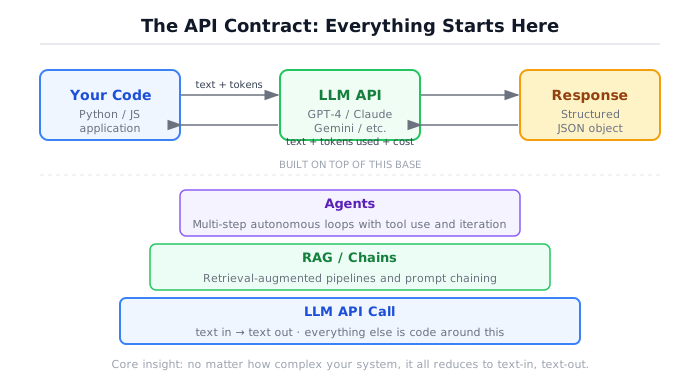
Everything starts here. You send text, you get text back. That’s it.
Every agent framework, every RAG pipeline, every chain-of-thought prompting technique, every multi-agent orchestration system is built on top of this one operation. Text in, text out. If you strip away every abstraction, this is what remains.
Here’s a raw API call using the Anthropic SDK:
import anthropic

client = anthropic.Anthropic()  # reads ANTHROPIC_API_KEY from env

message = client.messages.create(
    model="claude-sonnet-5",
    max_tokens=1024,
    messages=[
        {"role": "user", "content": "What is the capital of France?"}
    ]
)

print(message.content[0].text)
# "The capital of France is Paris."That raw SDK call is the simplest way to understand what is happening. It is useful for experiments and first contact. But it becomes painful in real systems: provider-specific code leaks into every file, testing requires live API calls, swapping models means rewriting imports, and cost tracking gets scattered.
The companion code wraps this single operation in a provider-neutral client. Same contract (text in, text out), but now testable, swappable, and observable:
from src.shared.model_client import create_client
from src.shared.types import CompletionRequest, Message, Role

client = create_client(provider="anthropic", api_key="...", model_name="claude-sonnet-5")

request = CompletionRequest(
    messages=[
        Message(role=Role.SYSTEM, content="You are a helpful assistant."),
        Message(role=Role.USER, content="What is the capital of France?"),
    ],
    temperature=0.0,
)

response = await client.complete(request)
print(response.content)
# "The capital of France is Paris."The rest of this book uses the wrapper because agents call the model hundreds of times per day, and you will want to track costs, swap between a fast cheap model and a slow expensive one depending on the task, and run tests without hitting a real API. The wrapper makes all of that possible by centralizing the one operation that matters.
This is the foundation. If you understand this, you understand 80% of what frameworks are doing. The other 20% is prompt management, tool routing, and retry logic. All useful. None of it magic.
Tokens, not words
LLMs don’t process words. They process tokens, which are chunks of text that roughly correspond to word fragments. The word “understanding” might be two tokens (“understand” + “ing”). A space before a word is often part of the token. A number like “42” is one token. The string “1234567890” might be three tokens.
Why does this matter? Because everything about LLMs is priced and bounded in tokens. Context windows are measured in tokens. API costs are per-token. Rate limits count tokens. Frontier models today ship 200K-to-1M-token context windows — a 1M window is roughly 750,000 words, or about 2,500 pages of prose. That sounds enormous. It’s still less than you think once you start filling it with system prompts, conversation history, retrieved documents, and tool results, and — as the next section covers — a big window doesn’t mean the model reads all of it equally well.
Here’s a quick estimator:
def count_tokens_estimate(text: str) -> int:
    """Rough token count: ~4 characters per token.

    Not exact (use tiktoken for precision), but good enough
    for cost projections and context budget planning.
    """
    return max(1, len(text) // 4)

# Try it
prompt = "Analyze this document and extract all mentions of financial risk."
tokens = count_tokens_estimate(prompt)
print(f"Estimated tokens: {tokens}")
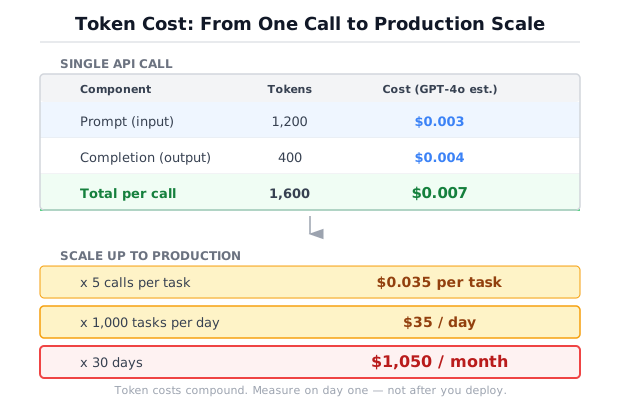
# Estimated tokens: 15Now the cost math. This is where engineers need to pay attention because costs sneak up on you. The table below is Anthropic-only — for other providers, check their pricing pages directly (OpenAI’s is at developers.openai.com/api/docs/pricing):
# Pricing per 1M tokens: (prompt_price, completion_price)
# Anthropic only. Pricing checked: 2026-07-02, via
# https://platform.claude.com/docs/en/about-claude/pricing
MODEL_PRICING = {
    "claude-sonnet-5":            (3.00, 15.00),
    "claude-haiku-4-5-20251001":  (1.00,  5.00),
}

def estimate_cost(prompt_tokens: int, completion_tokens: int, model: str) -> float:
    prompt_price, completion_price = MODEL_PRICING.get(model, (1.00, 5.00))
    return (prompt_tokens / 1_000_000) * prompt_price + \
           (completion_tokens / 1_000_000) * completion_price

# One call: cheap
cost_one = estimate_cost(prompt_tokens=1000, completion_tokens=500, model="claude-sonnet-5")
print(f"One call: ${cost_one:.4f}")
# One call: $0.0105

# 10,000 calls: not cheap
cost_day = cost_one * 10_000
print(f"10,000 calls: ${cost_day:.2f}")
# 10,000 calls: $105.00
Sonnet’s sticker price above is the standard rate. As of this check, Anthropic is also running introductory pricing on Sonnet ($2.00/$10.00 per million tokens) through 2026-08-31 — re-check the pricing page before you budget against it, since promotional rates expire and standard rates don’t.
Notice that completion tokens are 3-5x more expensive than prompt tokens across every major provider. This is not arbitrary. Generating tokens requires sequential computation, while reading prompt tokens can be partially parallelized. The practical implication: an agent that generates long, verbose reasoning is more expensive than one that generates concise answers, even if they read the same context.
One more variable belongs in this math: prompt caching. If your agent resends the same system prompt, tool definitions, or reference documents across calls — and most agents do — the repeated portion can be cached instead of reprocessed at full price. A cache write costs a little more than a normal read (roughly 1.25x for a short-lived cache, 2x for a longer-lived one), but a cache hit costs roughly 10% of the standard input price — a discount of roughly 90% on the tokens you didn’t have to re-process from scratch. That changes the arithmetic above: an agent resending 6,000 tokens of retrieved context on every tool-use round looks expensive until that context is a cache hit rather than a fresh read. Cache pricing checked: 2026-07-02, same pricing page.
The context window is your entire working memory
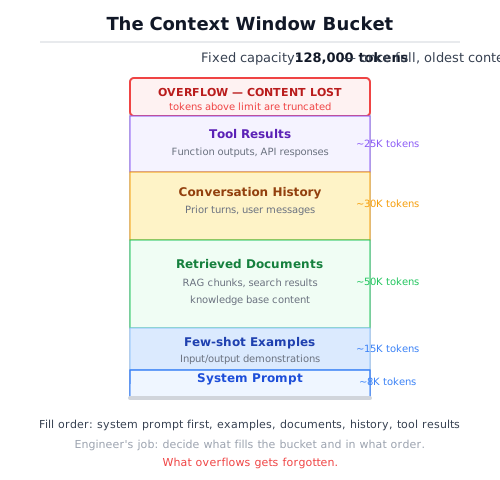
Think of the context window as RAM for the conversation. Everything the model knows about your current request has to fit inside it. The system prompt, the user’s message, the full conversation history, any documents you retrieved, the results from tool calls, all of it competes for one fixed-size bucket — and, as this section covers, not every part of that bucket gets read with equal attention.
This is the constraint that shapes every architectural decision in this book.
When you build a RAG system, you’re deciding what to put in the context window. When you design a multi-turn agent, you’re managing what stays in the context window across steps. When you pick a chunking strategy for documents, you’re optimizing for what fits in the context window.
Here’s what a typical context window looks like for an agent request, sized against a 200K-token window — the low end of what frontier models ship today, with several offering up to 1M:
┌─────────────────────────────────────────┐
│ System prompt              ~500 tokens  │
│ Tool definitions           ~800 tokens  │
│ Conversation history     ~2,000 tokens  │
│ Retrieved documents      ~6,000 tokens  │
│ Previous tool results    ~1,500 tokens  │
│ Current user message       ~200 tokens  │
│─────────────────────────────────────────│
│ TOTAL                   ~11,000 tokens  │
│ Remaining (200K model)  ~189,000 tokens │
└─────────────────────────────────────────┘
That much headroom looks like the overflow problem is solved, and it mostly is: five years ago, a model with an 8K-token window would have hit OVERFLOW on that same request before you added a single document — crashing outright used to be this section’s headline failure mode. Today’s larger windows genuinely fixed that. But headroom is not the same as reliability, and a bigger bucket introduced a subtler failure in its place.
The dangerous part: when the model reads a large context, it doesn’t attend to every token equally. Quality degrades on information buried in the middle of a long context, even when that information comfortably fits. The model starts ignoring instructions, especially ones sandwiched between a long system prompt and a large retrieved document. You won’t get an error. You’ll get a worse answer with no indication that anything went wrong — the same silent-degradation problem overflow used to cause, just triggered by position instead of size.
“Lost in the middle” is the name for this, and it’s not a vague observation. Liu et al.’s “Lost in the Middle: How Language Models Use Long Contexts” (arXiv:2307.03172) measured it directly: models retrieve information from the start and end of a context reliably, and retrieval degrades for information placed in the middle, a pattern that has persisted across model generations even as windows grew from thousands of tokens to hundreds of thousands. A vendor’s needle-in-a-haystack benchmark at launch is not the same guarantee as your production prompt structure avoiding this effect — see /signal/002-when-long-context-replaces-rag/ for the fuller argument and the literature behind it.
This is why context management is engineering, not just prompt writing. The decisions about what goes into the context, in what order, and what gets dropped when space is tight, these are architectural decisions with direct impact on system quality.
Why it hallucinates (and why you can’t prompt it away)
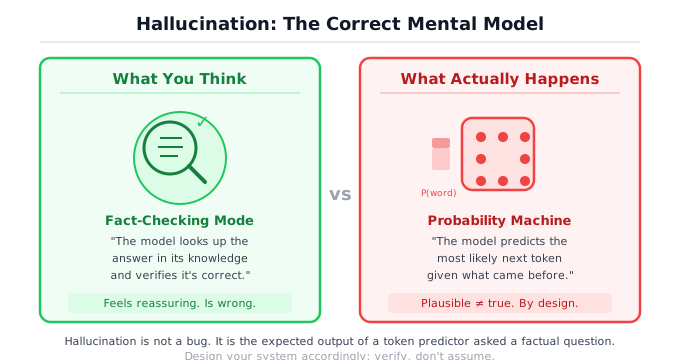
The model predicts the next likely token. That’s all it does. It is not looking up facts. It is not checking a database. It is generating the token sequence that is most probable given everything that came before it. When that process produces text that sounds authoritative but is factually wrong, we call it hallucination. But from the model’s perspective, nothing unusual happened. It produced a high-probability token sequence. It just happened to be wrong.
This is not a bug to fix. It is a fundamental property of how these models work. A model trained on text will produce text that looks like the text it was trained on. If the training data contains confident, well-structured explanations, the model will produce confident, well-structured explanations, whether or not they are correct.
You will read advice telling you to add “only answer based on the provided context” to your system prompt. This helps. It reduces the rate of hallucination. It does not solve the problem. The model can and will still generate plausible-sounding text that isn’t supported by the context. I’ve seen models cite specific paragraph numbers from documents that don’t have paragraph numbers. I’ve seen them invent API endpoints with correct-looking URL structures and reasonable-sounding parameter names. The text looks right because the model is very good at producing text that looks right.
Every reliable mitigation for hallucination is engineering, not prompting.
Grounding: Give the model source material and constrain it to answer from that material. This is what RAG does. It doesn’t eliminate hallucination, but it gives the model something real to work from.
Validation: Check the output against known facts, schemas, or constraints. If the model says the answer is in paragraph 3 of document X, verify that paragraph 3 of document X exists and says what the model claims.
Evaluation: Measure hallucination rates systematically across a test set. Not “try a few examples and see if it looks right.” Structured evaluation with labeled ground truth. Chapter 6 covers this in detail.
Escalation: When confidence is low, say so. “I don’t have enough information to answer this” is a better response than a confident wrong answer. Build your system to produce this response when the evidence is thin.
These are code solutions, not prompt solutions. Prompting helps at the margins, but you cannot prompt your way to production reliability. You can engineer your way there.
Temperature and sampling
When the model generates the next token, it doesn’t pick one deterministically (by default). It produces a probability distribution over all possible tokens, then samples from that distribution. Temperature controls how peaked or flat that distribution is.
Temperature 0 (or near-zero): The model almost always picks the highest-probability token. Output is deterministic, or very close to it. Same input produces the same output. This is the right default for agent decision paths, tool selection, structured extraction, and anything where you need reproducible behavior. Not every agent step needs temperature 0, though. Steps that generate diverse search queries, brainstorm alternative approaches, or produce varied rephrasing can benefit from a small amount of temperature (0.2-0.3).
Temperature 0.7-1.0: The distribution is flatter. Lower-probability tokens have a real chance of being selected. Output is more varied, more “creative.” This is useful for brainstorming, creative writing, or generating diverse examples.
Temperature above 1.0: The distribution is nearly flat and output becomes increasingly incoherent. In production agent systems, there is almost no reason to go above 1.0. In research or creative applications, controlled high temperature paired with top-p sampling can be useful for exploring the edges of a distribution. For everything in this book, stay at or below 0.3.
from src.shared.model_client import create_client
from src.shared.types import CompletionRequest, Message, Role

client = create_client(provider="anthropic", api_key="...", model_name="claude-sonnet-5")

# Temperature 0: deterministic, same answer every time
request_deterministic = CompletionRequest(
    messages=[
        Message(role=Role.SYSTEM, content="You are a helpful assistant."),
        Message(role=Role.USER, content="Name one benefit of unit testing."),
    ],
    temperature=0.0,
)

# Temperature 1.0: varied output, different answer each time
request_creative = CompletionRequest(
    messages=[
        Message(role=Role.SYSTEM, content="You are a helpful assistant."),
        Message(role=Role.USER, content="Name one benefit of unit testing."),
    ],
    temperature=1.0,
)

# Run the deterministic version 3 times: same answer
for _ in range(3):
    r = await client.complete(request_deterministic)
    print(r.content)
# "Unit testing catches regressions early..."
# "Unit testing catches regressions early..."
# "Unit testing catches regressions early..."

# Run the creative version 3 times: different answers
for _ in range(3):
    r = await client.complete(request_creative)
    print(r.content)
# "Unit testing catches regressions early..."
# "It provides a safety net when refactoring..."
# "Tests serve as living documentation..."There’s a common misconception that temperature 0 means “more accurate.” It doesn’t. It means “most probable.” The most probable completion can still be wrong. Temperature controls randomness, not correctness.
Structured output
The model generates text. Your code needs data. This gap is where a lot of production systems break.
When you ask a model to “return JSON,” you get text that usually looks like JSON. Usually. Sometimes the model wraps it in markdown code fences. Sometimes it adds a preamble (“Sure! Here’s the JSON:”). Sometimes it produces valid JSON that doesn’t match your schema. Sometimes it produces invalid JSON.
There are two approaches to reliable structured output. The first is provider-level enforcement, where the API guarantees the output matches a JSON schema. OpenAI’s response_format parameter and Anthropic’s tool use both support this. The second is parsing with fallbacks, which is what you use when provider enforcement isn’t available or when you’re working with models that don’t support it.
Here’s the parsing approach from this book’s codebase:
import json
import re

def parse_structured_output(text: str) -> dict | None:
    """Parse a JSON object from model output.

    Tries three strategies:
    1. The whole text is valid JSON.
    2. Extract the first {...} block.
    3. Give up and return None.
    """
    # Strategy 1: direct parse
    try:
        result = json.loads(text.strip())
        if isinstance(result, dict):
            return result
    except json.JSONDecodeError:
        pass

    # Strategy 2: regex extraction
    match = re.search(r"\{[^{}]*\}", text, re.DOTALL)
    if match:
        try:
            result = json.loads(match.group())
            if isinstance(result, dict):
                return result
        except json.JSONDecodeError:
            pass

    return None

# The model cooperates
clean = '{"status": "ok", "confidence": 0.95}'
print(parse_structured_output(clean))
# {"status": "ok", "confidence": 0.95}

# The model adds preamble
messy = 'Here is the analysis: {"result": "pass", "score": 87} Hope that helps!'
print(parse_structured_output(messy))
# {"result": "pass", "score": 87}

# The model ignores your instructions entirely
no_json = "I analyzed the document and found three key themes."
print(parse_structured_output(no_json))
# NoneThis is the bridge between “text generator” and “system component.” When the model returns structured data, you can write normal code around it. You can validate fields. You can route on values. You can feed the output into the next step of a pipeline. Without structured output, you’re writing string-parsing code that breaks every time the model decides to rephrase its response.
I think the right default is to use provider-level schema enforcement whenever it’s available, and fall back to parsing only when it’s not. Provider enforcement is more reliable, costs nothing extra, and removes an entire category of bugs. The parsing fallback exists for the real world, where you don’t always control which model you’re calling.
The validation ladder
Parsing is step one. But “valid JSON” is not the same as “data I can trust.” Production systems need three layers of validation after parsing: schema validation, semantic validation, and a clear failure policy.
This snippet is illustrative — unlike the other code samples in this chapter, it isn’t backed by a file in the companion repo. Adapt the pattern to your own validation needs rather than importing it directly.
from pydantic import BaseModel, Field, ValidationError
from datetime import date

# Layer 1: Schema validation
class ExtractionResult(BaseModel):
    answer: str = Field(min_length=1)
    confidence: float = Field(ge=0.0, le=1.0)
    source_document: str
    extracted_date: date


class ExtractionError(Exception):
    """Raised when structured extraction exhausts its retry budget."""

# Layer 2: Semantic validation
def validate_semantics(result: ExtractionResult, available_docs: list[str]) -> list[str]:
    """Business logic checks that schema validation can't catch."""
    errors = []
    if result.source_document not in available_docs:
        errors.append(f"Source '{result.source_document}' not in provided documents")
    if result.extracted_date > date.today():
        errors.append(f"Extracted date {result.extracted_date} is in the future")
    if result.confidence > 0.95 and len(result.answer) < 10:
        errors.append("High confidence with very short answer is suspicious")
    return errors

# Layer 3: Retry/repair with failure policy
async def extract_with_validation(
    client, messages: list, available_docs: list[str], max_retries: int = 2
) -> ExtractionResult:
    for attempt in range(max_retries + 1):
        response = await client.complete(
            CompletionRequest(messages=messages, temperature=0.0)
        )
        parsed = parse_structured_output(response.content)

        if parsed is None:
            messages.append(Message(
                role=Role.USER,
                content="Your response was not valid JSON. Return only a JSON object."
            ))
            continue

        try:
            result = ExtractionResult(**parsed)
        except ValidationError as e:
            messages.append(Message(
                role=Role.USER,
                content=f"JSON parsed but failed validation: {e}. Fix and retry."
            ))
            continue

        semantic_errors = validate_semantics(result, available_docs)
        if semantic_errors:
            messages.append(Message(
                role=Role.USER,
                content=f"Data failed business rules: {semantic_errors}. Fix and retry."
            ))
            continue

        return result

    raise ExtractionError("Structured extraction failed after retries")
The key principle: if structured output fails after your retry budget, return a typed error, not a raw string. Your downstream code should never have to guess whether it received valid data. Either it gets a validated ExtractionResult, or it gets an ExtractionError it can handle explicitly.
Provider behavior leaks through the abstraction
A provider-neutral client is worth building, but provider behavior still leaks through it.
| Area | How it varies across providers |
|---|---|
| Tool-call format | message shape and tool-choice control differ |
| Structured output | strict schema enforcement is not universal |
| Streaming | different event formats |
| Context caching | not portable across providers |
| Refusal behavior | different safety thresholds and phrasing |
| Token accounting | counted and priced differently per model |
| Parallel tool calls | supported unevenly |
The abstraction is worth keeping, but write tests against the provider you actually ship on.
Putting it together
You now have a mental model of the machine you are building with. It takes text, returns text, costs money per token, has a fixed memory, and confidently makes things up. Every engineering decision from here forward is about working within and around these constraints.
Now that you know the model is probabilistic, bounded by context, vulnerable to unsupported confident text, and unreliable at structure by default, the next engineering problems are concrete: How do you give it tools with contracts it cannot violate? How do you assemble context that fits the window without losing critical instructions? How do you evaluate whether the system actually works, not just looks like it works? And how do you bound its autonomy so it fails gracefully instead of confidently?
The next three sections build these answers. Section 0b gives the model hands. Section 0c gives it a loop — FN-004 has more on why the stop condition inside that loop is the hard, still-unsolved part. Section 0d shows you what frameworks do with both.
For hands-on experiments with everything in this section, see the LLM Explorer project.
Further reading
- Lost in the Middle: How Language Models Use Long Contexts — Liu et al., 2023 (arXiv:2307.03172). The paper behind the position-dependent degradation this chapter’s context-window section describes.
- Build a Large Language Model (From Scratch) — Raschka, 2024. The internals this chapter deliberately skips.
- Pricing — Anthropic. Official per-model, per-feature pricing, including the prompt-caching multipliers used in this chapter’s cost math. Checked 2026-07-02.
- API pricing — OpenAI. For comparing costs across providers.