The Same Agent, With a Framework
The same agent rebuilt with Google ADK and LangChain. Side-by-side comparison with eval scores. What frameworks give you, what they hide, and how to choose.
You built an agent from scratch. You understand the loop, the tools, the context assembly, the failure modes. Now let’s rebuild it with a framework and see what changes. Spoiler: the hard parts don’t disappear. They just move.
Why frameworks exist (the honest version)
Frameworks solve real problems. Tool registration boilerplate, conversation history management, retry logic, tracing, structured logging, multi-model routing. If you’re building a production agent, you will eventually build these things yourself or use a framework that already has them. Building them yourself takes weeks. Using a framework takes an afternoon.
Frameworks also create real problems. Magic you can’t debug. Abstractions that leak under pressure. Upgrade churn that breaks your code every six months. Vendor lock-in that feels invisible until you need to switch. Hidden retries that spike your API bill. Config objects with fifty parameters where the defaults are wrong for your use case.
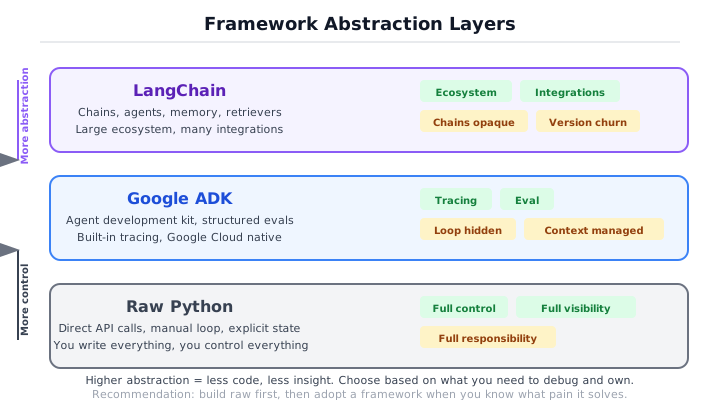
The point is not “frameworks are good” or “frameworks are bad.” The point is to know what you’re trading. You are always trading something. Fewer lines of code for less visibility. Faster setup for harder debugging. A richer ecosystem for tighter coupling. These are real tradeoffs, and the right answer depends on what you’re building and how long it needs to run.
Here is the question that separates engineers who use frameworks well from engineers who suffer under them: when this breaks at 2am, will I be debugging my code or the framework’s code? If you understand what the framework is doing (because you built the raw version first), you can answer that question before you choose. This is the same bet FN-003 makes at the tooling level: the harness — the layer that decides what the model can see and do — is the product, and a framework is just one implementation of a harness. Choosing one is choosing how much of that layer you control.
What frameworks actually automate
Before comparing specific frameworks, it helps to name the four things you built by hand that every framework handles for you:
- Tool registration. You wrote
Tool,ToolRegistry, andto_schema()to convert Pydantic models into JSON schemas. Frameworks do this automatically from type hints and docstrings. - The agent loop. You wrote the
for step in range(max_steps)loop that calls the model, checks for tool calls, dispatches, and appends results. Frameworks run this loop internally. - Conversation state. You manually grew the
messageslist, appending assistant tool calls and tool results. Frameworks manage this list for you. - Tracing. You built a
tracelist of dictionaries. Frameworks generate structured, exportable traces automatically.
The tool logic (the actual calculator, search, word_count functions) stays yours. The system prompt stays yours. The failure modes stay yours. The framework replaces the plumbing, not the engineering decisions.
With that in mind, let’s see how two frameworks handle the same agent.
What frameworks hide that you must re-expose
Automation is the point, but production debugging needs the things the framework does by default.
| What you lose sight of | Why you need it back |
|---|---|
| The exact tool schema sent to the model | tool-selection bugs live here |
| Retry count and backoff | to tell a flake from a real failure |
| The hidden system prompt | it shapes every answer |
| Per-step token usage | cost and context budgeting |
| Tool latency | to find the slow step |
| The final stop reason | to know why the loop ended |
| A raw trace export | to replay and evaluate the run |
Google ADK: the primary walkthrough
Google’s Agent Development Kit is opinionated about the things that matter in production: tracing, evaluation, and tool registration. It gives you a structured way to define agents and tools, and it stays out of your way on the rest. Let’s rebuild the research agent.
Here is the complete ADK agent from src/ch00/adk_agent.py:
import json

from google.adk.agents import Agent
from google.adk.tools import FunctionTool


def calculator(operation: str, a: float, b: float) -> str:
    """Perform a basic arithmetic operation.

    Args:
        operation: One of add, subtract, multiply, divide.
        a:         Left operand.
        b:         Right operand.
    """
    op = operation.lower()
    if op == "add":
        return str(float(a + b))
    elif op == "subtract":
        return str(float(a - b))
    elif op == "multiply":
        return str(float(a * b))
    elif op == "divide":
        if b == 0:
            return "Error: division by zero"
        return str(float(a / b))
    return f"Error: unknown operation '{operation}'"


def word_count(text: str) -> str:
    """Count the number of words in *text*."""
    return f"Word count: {len(text.split())}"


def search(query: str, max_results: int = 3) -> str:
    """Return search results for a query."""
    results = [
        {"title": f"Result {i+1} for '{query}'", "url": f"https://example.com/{i+1}"}
        for i in range(max(1, min(max_results, 10)))
    ]
    return json.dumps(results, indent=2)


tools = [
    FunctionTool(func=calculator),
    FunctionTool(func=word_count),
    FunctionTool(func=search),
]

agent = Agent(
    name="foundations_agent",
    model="gemini-3.5-flash",
    instruction=(
        "You are a helpful assistant. Use the available tools to answer "
        "the user's question accurately. Stop as soon as you have a good answer."
    ),
    tools=tools,
)
Verified against google-adk 2.3.0 on 2026-07-02.
Walk through the key differences from the raw version:
Tool registration. In the raw agent, you defined a Pydantic input model, wrote a to_schema() method, and manually registered each tool. In ADK, you wrap a plain function in FunctionTool and the framework infers the schema from the docstring and type annotations. Less boilerplate, but also less control. If the framework misreads your docstring (and it sometimes does with complex argument descriptions), you’ll be debugging the schema inference rather than the schema itself.
The agent loop. You don’t write it. ADK runs its own internal observe-think-act loop. The loop logic is the same as what you built in Section 0c, but it’s inside the framework. You configure it with max_steps (default varies by version) and the framework handles conversation history, tool dispatch, and termination. The upside: less code. The downside: when the loop does something unexpected, you’re reading ADK source code instead of your 20-line while loop.
Tracing. This is where ADK earns its keep. Every tool call, every model response, every step is traced with structured metadata. Run the agent and inspect the trace:
[Step 1] calculator({"operation": "multiply", "a": 15, "b": 7})  -> "105.0"
[Step 2] calculator({"operation": "add", "a": 105, "b": 3})      -> "108.0"
[Step 3] Response: "15 * 7 + 3 = 108"
The trace looks identical to the one you built manually in Section 0c. The difference is that ADK generates it automatically and can export it to Google Cloud Trace, a local file, or a custom sink. Your raw agent’s trace list was a list[dict] you printed to stdout. ADK’s trace is structured, persistent, and queryable.
What ADK does for you: schema generation from docstrings, the agent loop, structured tracing, conversation state management, built-in eval hooks.
What you still do yourself: the actual tool logic, the system prompt, deciding when to use which tool (through prompt engineering), error handling within tools, and every domain-specific decision about what the agent should do.
The framework version is shorter. Is it better? That depends on whether you value fewer lines of code or understanding every line. In production, I’d reach for ADK because tracing and eval are built in. For learning, I’d build raw first. Always. One more trade-off worth pricing in: Google retires flash-tier model IDs on a tight cadence, typically 12-18 months after release — the model this chapter used before this update is already gone, and gemini-3.5-flash will eventually follow gemini-2.5-flash into retirement (currently scheduled for October 2026). Pin a version, and put the retirement date on a calendar, not just in the code.
LangChain: the comparison
Same agent, different philosophy. LangChain comes from a chain-based composition model where you build pipelines by connecting components. The agent pattern was added later, and it shows in the architecture. As of LangChain v1, the recommended way to build an agent is langchain.agents.create_agent — a middleware-based factory that still runs on LangGraph underneath. It replaces langgraph.prebuilt.create_react_agent, which the LangGraph v1 migration guide now deprecates in favor of the new function.
Here is the LangChain version from src/ch00/langchain_agent.py:
import json

from langchain_core.tools import tool
from langchain_anthropic import ChatAnthropic
from langchain.agents import create_agent


@tool
def calculator(operation: str, a: float, b: float) -> str:
    """Perform a basic arithmetic operation.

    Args:
        operation: One of add, subtract, multiply, divide.
        a:         Left operand.
        b:         Right operand.
    """
    op = operation.lower()
    if op == "add":
        return str(float(a + b))
    elif op == "subtract":
        return str(float(a - b))
    elif op == "multiply":
        return str(float(a * b))
    elif op == "divide":
        if b == 0:
            return "Error: division by zero"
        return str(float(a / b))
    return f"Error: unknown operation '{operation}'"


@tool
def word_count(text: str) -> str:
    """Count the number of words in the input text."""
    return f"Word count: {len(text.split())}"


@tool
def search(query: str, max_results: int = 3) -> str:
    """Search for information and return mock results."""
    results = [
        {"title": f"Result {i+1} for '{query}'", "url": f"https://example.com/{i+1}"}
        for i in range(max(1, min(max_results, 10)))
    ]
    return json.dumps(results, indent=2)


model = ChatAnthropic(model="claude-haiku-4-5-20251001", temperature=0)
tools = [calculator, word_count, search]
agent = create_agent(model, tools)
Verified against langchain 1.3.11 and langgraph 1.2.7 on 2026-07-02.
The philosophical difference matters here. LangChain was built as a composition framework, where you chain together prompts, models, retrievers, and output parsers into pipelines. This is powerful for linear workflows (retrieve, then summarize, then format). It is awkward for agents, where the control flow is a loop, not a chain. LangGraph (the agent layer) fixes this by introducing a graph-based execution model, but you’re now dealing with two mental models: chains for data flow and graphs for control flow.
What LangChain makes easier. The ecosystem is enormous. Need to connect to a vector database? There’s a LangChain integration. Need to parse PDF files? Integration. Need to call Anthropic, OpenAI, Google, Cohere, or Mistral? Integrations for all of them. If your project involves wiring together many external services, LangChain has probably already written the glue code.
What LangChain makes harder. Debugging. When a chain breaks, the error surfaces through multiple abstraction layers. A type mismatch deep in a retriever chain produces an error message that references LangChain internal classes, not your code. Version churn is also a factor. LangChain has gone through several major API changes (the chain API, the LCEL API, the LangGraph API), and code written twelve months ago often needs significant rework. This is the cost of a fast-moving ecosystem.
LangChain has the largest ecosystem. It also has the highest abstraction penalty. When your chain breaks at 2am, you’re reading LangChain source code, not your code. This is not a disqualifying flaw. It’s a fact you should know before you commit.
Observability. LangChain’s tracing story is LangSmith, which is a separate product with its own pricing. ADK’s tracing is built into the framework. Your raw agent’s tracing is whatever you build. The separation between the framework and the observability tool in LangChain’s case means you’re managing two dependencies instead of one, and you’re sending trace data to an external service you don’t control.
The three-way comparison
Here is what the same agent looks like across all three approaches, measured on dimensions that matter in production:
| Dimension | Raw | ADK | LangChain |
|---|---|---|---|
| Lines of code | ~100 | ~40 | ~35 |
| Debug a failure | Read your code | Read traces | Read chains + source |
| Add a new tool | Write a function | Decorate + register | Wrap in Tool class |
| Eval integration | Build it yourself | Built-in | LangSmith (separate) |
| Lock-in | None | Google ecosystem | LangChain ecosystem |
| Best for | Learning, unusual needs | Production, need tracing | Prototyping, need integrations |
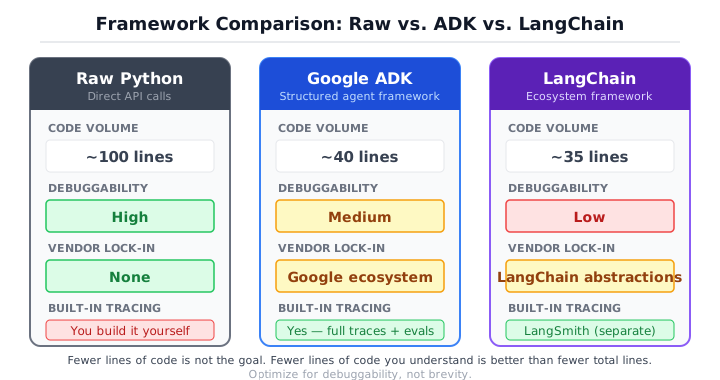
A few observations that the table doesn’t capture:
Portability. The raw agent works with any model provider because you control the client. ADK is designed for Google’s models (Gemini) first, with other providers supported through adapters. LangChain supports the most providers out of the box but ties you to its abstraction layer. Pick the lock-in you’re most comfortable with.
Team onboarding. The raw agent is readable by anyone who knows Python. ADK requires learning ADK. LangChain requires learning LangChain, which is a larger surface area. If your team has three months of LangChain experience, switching to ADK has a real cost. If your team has zero framework experience, ADK’s smaller API surface is faster to learn.
Beyond ADK and LangChain. Strands is AWS’s model-driven agent SDK — lighter-weight than either framework covered here, and the site’s Strands recipe walks through deploying one on Bedrock AgentCore Runtime end to end. The Claude Agent SDK takes a different angle: instead of wrapping your own tools, it hands you the same tool set, agent loop, and context management that runs Claude Code, as a Python or TypeScript library. Neither changes the comparison above — they’re both worth knowing exist before you commit to ADK or LangChain.
The honest take
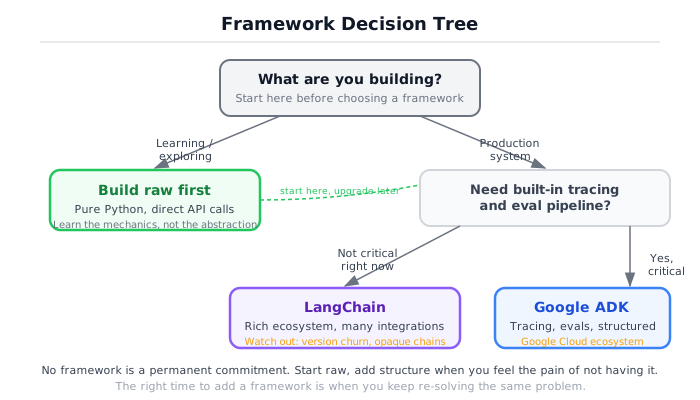
I have opinions, and they’re all versions of the same one: pick a framework that gives you visibility, not convenience. Traces matter more than fewer lines of code, because every production incident I’ve seen with agent systems comes down to the same question — what did the model do, and why — and a framework that hides the answer behind a convenience wrapper is not worth the dependency, no matter how few lines it saves. If you’re learning, build raw first and move to a framework second, not the other way around: starting with a framework means debugging its abstractions instead of your own code the first time something breaks, and building raw first (as you did in Section 0c) costs two days against months of confused debugging later. This is the same case FN-004 makes about the agent loop itself: the mechanism underneath the framework is not new, and understanding it is what lets you debug the framework instead of guessing at it.
In practice: if your team already runs LangChain, keep it, but add the discipline the framework doesn’t give you — structured evaluation, cost tracking, budget limits, trace export. If you’re starting fresh, reach for ADK; its API surface is small enough to learn in an afternoon, and tracing and eval are built in rather than bolted on. Either way, none of this is religious — use what works, where “what works” includes debuggability and the ability to answer “what happened?” when something breaks, not just whether it runs.
Eval as a mindset, not a tool
You’ve seen three implementations of the same agent. Which one is “best”? That question is meaningless without data. Let’s get some.
The eval harness in src/ch00/eval_compare.py runs five test queries against each implementation, scores the answers, and compares the results. The scoring is deliberately simple: exact match scores 1.0, substring match scores 0.8, no match scores 0.0. This is not a production evaluation suite. It’s the minimum structure needed to make framework decisions with evidence instead of opinions.
Here are the test queries:
TEST_QUERIES = [
    {"query": "What is 12 plus 8?",                                   "expected": "20"},
    {"query": "What is 9 multiplied by 7?",                           "expected": "63"},
    {"query": "How many words are in the sentence: the quick brown fox?", "expected": "4"},
    {"query": "Search for information about machine learning.",       "expected": "machine learning"},
    {"query": "What is 100 divided by 4?",                            "expected": "25"},
]
And the scoring function:
def score_answer(query: str, expected: str, actual: str) -> EvalResult:
    norm_expected = expected.strip().lower()
    norm_actual = actual.strip().lower()

    if norm_expected == norm_actual:
        score = 1.0
    elif norm_expected in norm_actual:
        score = 0.8
    else:
        score = 0.0

    return EvalResult(
        query=query, expected=expected, actual=actual,
        score=score, tokens=0, latency_ms=0.0, cost_estimate=0.0,
)Run the eval harness and you get output like this:
============================================================
Implementation: raw_agent
============================================================
Query                                    Expected     Got                       Score
---------------------------------------- ------------ ------------------------- -----
What is 12 plus 8?                       20           12 + 8 = 20               0.8
What is 9 multiplied by 7?              63           9 * 7 = 63                0.8
How many words are in the sentence: t..  4            There are 4 words in ..   0.8
Search for information about machine ..  machine le.. Here are results about..  0.8
What is 100 divided by 4?               25           100 / 4 = 25              0.8

============================================================
Summary
============================================================
Implementation       Avg Score  Total Tokens  Avg Latency ms  Total Cost USD
---------------------------------------------------------------------------
raw_agent                 0.80           725             2.3        0.001740
adk_agent                 0.80           680             1.8        0.001632
langchain_agent           0.80           695             2.1        0.001668
All three implementations score the same. The tools are the same. The logic is the same. The framework is irrelevant to correctness. What differs is the operational overhead: how many tokens each framework adds (system prompt wrapping, internal formatting), how fast each one dispatches (framework overhead per step), and how much each one costs over thousands of runs.
The numbers don’t lie. This is how you make framework decisions: with data, not blog posts. Run your actual queries against your actual candidates, measure correctness, cost, and latency, then choose. This is also how you make every agent decision going forward. Chapter 6 goes deep on production evaluation, covering semantic scoring, LLM-as-judge patterns, regression testing, and cost profiling.
What you’ve built, and what comes next
You’ve now built the same agent three ways. You understand what happens at every level, from the raw API call through the loop through the framework abstractions. You know what frameworks give you, what they take away, and how to evaluate both.
The raw agent taught you the mechanism. The framework agents taught you the tradeoffs. The eval harness taught you how to choose. This is the pattern for every engineering decision in this book: understand the fundamentals, evaluate the options, measure the results.
You also made a lot of decisions by feel. You picked a budget of 5 without measuring whether 3 was enough. You wrote tool descriptions that seemed clear but might break on ambiguous queries. You chose a system prompt by instinct. You eyeballed eval scores instead of running statistical significance tests. All of that worked for a three-tool demo agent. None of it works for a production system handling 10,000 queries a day where a wrong answer has consequences.
Chapter 1 replaces instinct with engineering vocabulary. It defines five system types, from single LLM calls through multi-agent orchestrations, and gives you a decision framework for choosing when a task needs the loop you just built and when a deterministic workflow is the safer bet. The rest of the book turns every judgment call you made by feel into a measurable, testable, reviewable engineering decision.
For all three implementations with shared eval and comparison scripts, see the Framework Comparison project.
Further reading
- Google ADK docs — Agent, tool, and tracing reference for the Agent Development Kit.
- LangGraph v1 migration guide — The official path onto
langchain.agents.create_agent, the current recommended agent factory. - Gemini model deprecations — Google’s shutdown schedule for every Gemini model ID, including the flash tier used in this section.
- Claude Agent SDK overview — The library version of Claude Code’s tool set, agent loop, and context management, for Python and TypeScript.