From API Calls to Tool Use
How to go from sending text to having the model take actions. Function calling demystified, schema validation, and the bridge from text generator to system component.
In the last section, the model could only talk. In this one, it learns to do things. The difference is smaller than you think: about 15 lines of code.
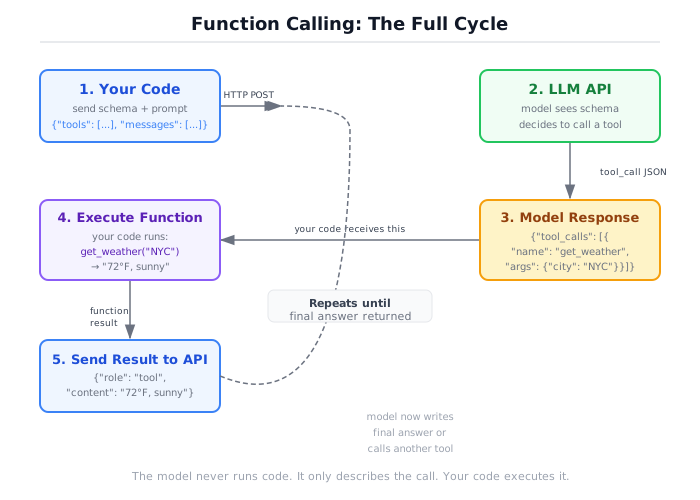
Here is what actually happens when a model “uses a tool”: your code sends a list of function signatures to the API. The model reads those signatures and, instead of returning a text response, returns a JSON blob that says “call this function with these arguments.” Your code calls the function. You send the result back to the model. The model uses the result to generate a text response. That’s the entire mechanism. No remote procedure calls. No plugin system. No runtime loaded from the model’s side. The model writes JSON. You do the work. Anthropic’s tool-use guide documents this same request/response contract from one provider’s side; every other major API follows the same shape.
Before we get to function calling, though, we need to talk about the two techniques that make it actually work in production: structured prompting and few-shot examples. These aren’t optional. They’re the difference between a system that works in demos and one that works at 2am when you’re asleep.
Prompting as engineering, not art
System prompts are code. Version them. Test them. Review them in pull requests. If your prompt engineering process is “try things until it works,” you’re debugging without logs.
Here’s a prompt I see in prototypes all the time:
You are a helpful assistant that analyzes data.This prompt tells the model almost nothing. What kind of data? What does “analyze” mean? What format should the output be in? The model will fill in the gaps with its own interpretation, and that interpretation will change between calls, between models, and between API versions. You’ve written a function with no type signature and no docstring, then wondered why consumers use it wrong.
Here’s the same prompt written like code:
You are a financial data analyst. You receive quarterly revenue data as CSV.
Your job: identify the quarter-over-quarter growth rate for each line item.

Rules:
1. Output valid JSON with the schema: {"line_items": [{"name": str, "q1": float, "q2": float, "growth_pct": float}]}
2. Calculate growth as: (q2 - q1) / q1 * 100, rounded to 1 decimal place.
3. If q1 is zero, set growth_pct to null.
4. Do not include commentary. Return only the JSON object.The principle: every ambiguity in a prompt is a degree of freedom the model will use in ways you didn’t intend. Treat your system prompt as a contract, the same way you’d treat a function signature or an API spec.
Version your prompts in source control. When output quality degrades, git diff the prompt. When you swap models, run your prompt test suite. This is not overhead. This is the minimum viable engineering practice for systems that depend on natural language interfaces.
Few-shot examples are your type system
When the model needs to follow a pattern, show it the pattern. This is called few-shot prompting, and in my experience it is the most effective technique for getting consistent structured output.
Consider a task where you need the model to classify customer support messages into categories. Without examples:
messages = [
    {"role": "system", "content": """Classify the following support message
into exactly one category: billing, technical, account, or general.
Return only the category name, lowercase, no punctuation."""},
    {"role": "user", "content": "I can't log into my account after resetting my password"}
]
# Model might return: "account"
# Model might return: "Account"
# Model might return: "This is an account issue."
# Model might return: "technical (login issue)"
The model understood the task. It just couldn’t commit to a format. Now with two examples:
messages = [
    {"role": "system", "content": """Classify the following support message
into exactly one category: billing, technical, account, or general.
Return only the category name, lowercase, no punctuation."""},
    {"role": "user", "content": "My credit card was charged twice this month"},
    {"role": "assistant", "content": "billing"},
    {"role": "user", "content": "The dashboard keeps showing a 500 error"},
    {"role": "assistant", "content": "technical"},
    {"role": "user", "content": "I can't log into my account after resetting my password"}
]
# Model returns: "account"
# Every time.Two to three examples is the sweet spot for most tasks. One example can be dismissed as coincidence. Four or more starts eating context budget without proportional improvement. Pick examples that cover your edge cases: one straightforward case, one boundary case, and one that’s easy to get wrong.
Few-shot examples are particularly powerful for tool-using systems. When the model sees examples of choosing the right tool for a given query, it learns the selection criteria far more reliably than from descriptions alone. We’ll come back to this when we discuss tool selection later in this section.
Function calling from scratch
This is the core mechanism. Every agent framework wraps it. Every tool-using system depends on it. And there is no magic. The model outputs JSON that says “call this function with these arguments.” Your code does the calling.
The cycle has five steps:
- You define tool schemas (JSON that tells the model what tools exist)
- You send those schemas alongside the user’s message
- The model responds with a structured tool call (not text, but a JSON object naming the function and its arguments)
- Your code validates the arguments, executes the function, and returns the result
- You send that result back to the model, which reads it and generates a final text response
Let’s build this from scratch. First, we need a way to define tools.
The code below uses Pydantic, a Python library for data validation using type annotations. If you have used dataclasses, think of Pydantic as dataclasses with built-in validation: you declare fields with types, and Pydantic rejects any input that does not match. BaseModel is the base class. Field adds constraints like minimum values or defaults. model_validate() checks a dictionary against the type annotations and raises ValidationError if anything is wrong. We use it here because the model will send us JSON arguments, and we need to validate those arguments before running any code.
Here is the Tool class and ToolRegistry from this book’s companion code:
from pydantic import BaseModel, Field
from enum import StrEnum
from typing import Any, Callable, Type


class Tool:
    """An entry in the tool registry.

    Holds the callable function and its associated Pydantic input model so
    arguments can be validated before dispatch.
    """

    def __init__(
        self,
        name: str,
        description: str,
        fn: Callable[..., str],
        input_model: Type[BaseModel],
    ) -> None:
        self.name = name
        self.description = description
        self.fn = fn
        self.input_model = input_model


class ToolRegistry:
    """Registry that maps tool names to Tool entries."""

    def __init__(self) -> None:
        self._tools: dict[str, Tool] = {}

    def register(
        self,
        name: str,
        description: str,
        fn: Callable[..., str],
        input_model: Type[BaseModel],
    ) -> None:
        self._tools[name] = Tool(
            name=name, description=description, fn=fn, input_model=input_model
        )

    def get_schemas(self) -> list[dict]:
        """Return schema objects for all registered tools."""
        return [entry.to_schema() for entry in self._tools.values()]

    def get(self, name: str) -> Tool | None:
return self._tools.get(name)Now let’s define some actual tools. A calculator:
class Operation(StrEnum):
    ADD = "add"
    SUBTRACT = "subtract"
    MULTIPLY = "multiply"
    DIVIDE = "divide"


class CalculatorInput(BaseModel):
    """Input schema for the calculator tool."""
    operation: Operation
    a: float
    b: float


def calculator(operation: str, a: float, b: float) -> str:
    op = Operation(operation)
    if op == Operation.ADD:
        return str(float(a + b))
    elif op == Operation.SUBTRACT:
        return str(float(a - b))
    elif op == Operation.MULTIPLY:
        return str(float(a * b))
    elif op == Operation.DIVIDE:
        if b == 0:
            return "Error: division by zero"
        return str(float(a / b))
    return f"Error: unknown operation '{operation}'"
And a search tool:
import json

class SearchInput(BaseModel):
    """Input schema for the fake search tool."""
    query: str
    max_results: int = Field(default=3, ge=1, le=10)


def fake_search(query: str, max_results: int = 3) -> str:
    results = [
        {"title": f"Result {i + 1} for '{query}'",
         "url": f"https://example.com/{i + 1}"}
        for i in range(max_results)
    ]
    return json.dumps(results, indent=2)
Now the critical piece: the Tool.to_schema() method that converts a Pydantic model into the JSON schema the model needs:
def to_schema(self) -> ToolSchema:
    """Derive a ToolSchema from the Pydantic model's field definitions."""
    parameters: list[ToolParameter] = []
    model_fields = self.input_model.model_fields

    for field_name, field_info in model_fields.items():
        annotation = field_info.annotation
        type_str = _python_type_to_json_type(annotation)

        enum_values: list[str] | None = None
        if isinstance(annotation, type) and issubclass(annotation, StrEnum):
            enum_values = [e.value for e in annotation]

        parameters.append(
            ToolParameter(
                name=field_name,
                type=type_str,
                description=field_info.description or field_name,
                required=field_info.is_required(),
                enum=enum_values,
            )
        )

    return ToolSchema(
        name=self.name,
        description=self.description,
        parameters=parameters
)This is the full picture. You define a function. You define a Pydantic model that describes its inputs. You register both in the registry. The registry generates schemas. You send those schemas to the model. The model reads them and decides whether to call a tool and with what arguments.
Now let’s see what happens on the other side. When the model decides to use a tool, it doesn’t return text. It returns a ToolCall object:
# This is what the model returns instead of text:
{
    "id": "call_001",
    "name": "calculator",
    "arguments": {"operation": "add", "a": 100, "b": 200}
}
Your code receives this, looks up the tool in the registry, validates the arguments, and executes the function:
from pydantic import ValidationError

def execute_tool_call(
    registry: ToolRegistry, tool_name: str, arguments: dict[str, Any]
) -> str:
    """Validate and execute a tool call from the model."""
    entry = registry.get(tool_name)
    if entry is None:
        return f"Error: unknown tool '{tool_name}'"

    try:
        validated = entry.input_model.model_validate(arguments)
    except ValidationError as exc:
        return f"Validation error: {exc}"

    try:
        return entry.fn(**validated.model_dump())
    except Exception as exc:
return f"Error executing tool '{tool_name}': {exc}"Called directly, execute_tool_call() demonstrates steps 3 and 4 in isolation — a hardcoded call standing in for what the model would send, then validation and dispatch:
registry = create_default_registry()

# Direct call: what is 6 * 7?
result = execute_tool_call(
    registry, "calculator",
    {"operation": "multiply", "a": 6, "b": 7}
)
print(result)
# "42.0"

# Division by zero: handled gracefully
result = execute_tool_call(
    registry, "calculator",
    {"operation": "divide", "a": 10, "b": 0}
)
print(result)
# "Error: division by zero"
That covers steps 3 and 4 with a hardcoded stand-in for the model’s request. To see all five steps run together — schema out, tool call back, execute, result back, final answer — wire in a client. MockClient is this book’s provider-neutral stand-in for a real API: it returns canned responses in order, so the example runs with no API key and no network call, but the request/response shapes (CompletionRequest, CompletionResponse, Message, ToolCall, ToolResult) are the same ones a real AnthropicClient or OpenAIClient would produce:
import asyncio

from src.shared.model_client import MockClient
from src.shared.types import (
    CompletionRequest,
    CompletionResponse,
    Message,
    Role,
    TokenUsage,
    ToolCall,
    ToolResult,
)


async def ask(question: str) -> str:
    registry = create_default_registry()
    messages = [Message(role=Role.USER, content=question)]

    # Canned responses in order: the tool call, then the final text answer --
    # the same two round trips a live model makes.
    client = MockClient(
        responses=[
            CompletionResponse(
                tool_calls=[
                    ToolCall(id="call_001", name="calculator",
                              arguments={"operation": "multiply", "a": 6, "b": 7}),
                ],
                model="mock",
                usage=TokenUsage(prompt_tokens=42, completion_tokens=18, total_tokens=60),
            ),
            CompletionResponse(content="6 times 7 is 42.", model="mock"),
        ]
    )

    # Steps 1-2: schemas travel alongside the message list.
    request = CompletionRequest(messages=messages, tools=registry.get_schemas())

    # Step 3: the model returns a tool call instead of text.
    response = await client.complete(request)
    tool_call = response.tool_calls[0]

    # Step 4: your code validates and executes.
    result = execute_tool_call(registry, tool_call.name, tool_call.arguments)

    # Step 5: append the call and its result, then ask again.
    messages.append(Message(role=Role.ASSISTANT, content="", tool_calls=[tool_call]))
    messages.append(Message(
        role=Role.TOOL,
        content="",
        tool_results=[ToolResult(tool_call_id=tool_call.id, name=tool_call.name, content=result)],
    ))
    final_request = CompletionRequest(messages=messages, tools=registry.get_schemas())
    final_response = await client.complete(final_request)
    return final_response.content


print(asyncio.run(ask("What is 6 times 7?")))
# "6 times 7 is 42."That is the entire mechanism behind function calling. You defined a Pydantic model, wrote to_schema() to generate the JSON schema, built execute_tool_call() to validate and dispatch, and appended the result so the model could close the loop with a final answer. Every major framework automates exactly these steps: LangChain’s @tool decorator and Google ADK’s FunctionTool both read your type hints for the schema and your docstring for the description; only the syntax differs. CrewAI’s tool registration follows the same pattern. You built it by hand so you understand what the framework is doing when it hides these lines from you. Section 0d covers the framework-specific syntax.
Schema validation is your safety net
The model will hallucinate arguments. Not occasionally. Routinely. The model will pass a string where you need an integer. It will invent parameters that don’t exist. It will pass “modulo” as an operation to your calculator that only knows add, subtract, multiply, divide.
Without validation, here’s what happens:
# Without Pydantic validation: the model passes "modulo"
try:
    Operation("modulo")
except ValueError as e:
    print(f"Raw error: {e}")
# Raw error: 'modulo' is not a valid Operation
That ValueError crashes your tool execution. If you’re not catching it, it crashes your agent loop. If you are catching it but returning a generic “something went wrong” message, the model has no idea what went wrong and will likely try the same thing again.
With Pydantic validation, the error is specific and actionable:
from pydantic import ValidationError

# With Pydantic: structured error that the model can learn from
try:
    CalculatorInput(operation="modulo", a=10, b=3)
except ValidationError as exc:
    print(exc)
1 validation error for CalculatorInput
operation
Input should be 'add', 'subtract', 'multiply' or 'divide'
[type=enum, input_value='modulo', input='modulo']This is why every tool in the companion code has a Pydantic input model. Not for elegance. For survival. Here are the failure modes that validation catches:
Wrong type: The model passes "seven" instead of 7 for a numeric parameter. Pydantic rejects it (or coerces it, depending on your config). Without validation, your arithmetic function receives a string and either crashes or produces nonsense.
Missing required field: The model forgets to include the operation parameter. Pydantic reports exactly which field is missing. Without validation, your function receives None and crashes with a confusing AttributeError.
Extra fields: The model invents a precision parameter that your calculator doesn’t support. Pydantic ignores it by default (configurable). Without validation, your function receives an unexpected keyword argument.
Out of range: The SearchInput model constrains max_results to between 1 and 10 using Field(ge=1, le=10). The model passes 500. Pydantic rejects it with a clear message. Without validation, your search function tries to generate 500 results.
# max_results out of range
result = execute_tool_call(
    registry, "search",
    {"query": "python best practices", "max_results": 500}
)
print(result)
# Validation error: 1 validation error for SearchInput
# max_results
#   Input should be less than or equal to 10
#     [type=less_than_equal, input_value=500, input=500]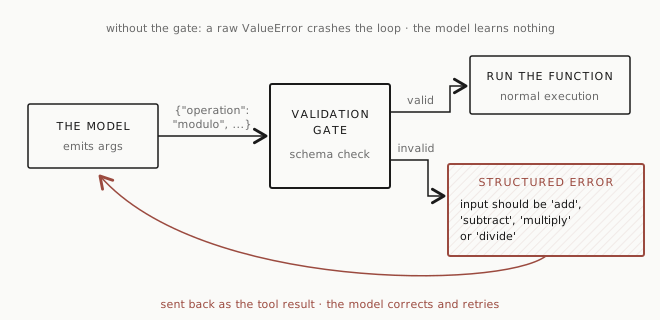
Validation isn’t just about preventing crashes. It’s about giving the model enough information to self-correct. A model that receives “Validation error: Input should be ‘add’, ‘subtract’, ‘multiply’ or ‘divide’” will fix its next attempt. A model that receives “Error: unhandled exception in tool execution” will guess, and guess wrong.
Validation is not authorization
Everything above proves the arguments are well-formed: the type is right, the required fields are present, the values sit inside their range. None of that proves the action itself is allowed.
Run the calculator’s arguments and a send-money tool’s arguments through the same kind of Pydantic model and they can both pass: right types, required fields present, values in range. Pydantic has no opinion about what happens after it returns. It checks the shape of the argument, not the shape of the consequence. Real tools send email, move money, and delete records, and a validator that only checks shape will wave all three through with the same confidence it waves through a calculator call.
That’s why every tool needs a second classification, separate from its input schema: read-only or side-effecting. A read-only tool looks something up and leaves the world exactly as it found it: search a knowledge base, check a weather API, read a customer record. Get it wrong and you’ve shown someone the wrong answer. A side-effecting tool changes something outside the model’s context window. Get it wrong and something happened that you now have to notice, undo, or apologize for, and some of the time you can’t undo it at all.
Schema validation treats both kinds of tool identically, because to a validator they are identical: a name and an object of arguments. The check that tells them apart sits after validation, right before execution:
if not policy.allowed(user, tool_name, args):
    return ToolResult(error="not authorized")
A call that clears every check in the section above, right type, all fields present, values in range, can still fail this one. Valid is not the same as allowed. Section 0f turns that single check into five separate questions you ask before every tool call.
Multiple tools and selection
Give the model three tools and a question. Watch what happens.
registry = create_default_registry()

# Four tools registered:
print(registry.list_tools())
# ['calculator', 'word_count', 'search', 'delete_record']
The fourth tool is deliberately gated; Section 0c shows what happens when an agent tries to call it.
When you send a message like “What is 42 times 17?” along with all four tool schemas, the model reads the descriptions and picks calculator. When you send “How many words are in the Gettysburg Address?”, it picks word_count. When you send “Find me information about Rust async patterns,” it picks search.
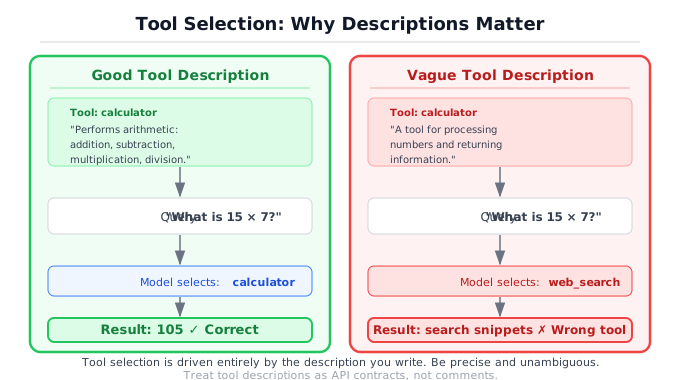
This works because the tool descriptions are clear and distinct. The model selects tools by matching the user’s intent to the tool descriptions. This is not semantic search. It is not embeddings. It is the model reading your descriptions and making a judgment call, the same way a person would read an API catalog and pick the right endpoint.
Tool descriptions are your API documentation for the model. Write them like you’d write docs for a junior developer who takes everything literally — because that’s exactly what’s happening on the other side.
Here are the descriptions from the companion code:
registry.register(
    name="calculator",
    description="Perform basic arithmetic: add, subtract, multiply, "
                "or divide two numbers.",
    fn=calculator,
    input_model=CalculatorInput,
)
registry.register(
    name="word_count",
    description="Count the number of words in a piece of text.",
    fn=word_count,
    input_model=WordCountInput,
)
registry.register(
    name="search",
    description="Search for information on a topic and return "
                "the top results.",
    fn=fake_search,
    input_model=SearchInput,
)When does the model choose wrong? When the descriptions overlap or when the query is ambiguous. Consider this message: “What’s the word count of ‘four score and seven years ago’?”
The model should pick word_count. But I’ve seen models pick calculator because they interpret “count” as a numeric operation and try to count the words themselves using arithmetic. This happens more often with smaller models and with vague descriptions.
The fix is better descriptions, not more complex routing logic. If you find the model consistently selecting the wrong tool, the description is the first place to look. Make it more specific. Add what the tool is NOT for if the confusion is persistent. “Count the number of words in a piece of text. Do not use for arithmetic or calculations.” This sounds redundant to a human reader. It’s not redundant to the model.
A few practical guidelines for tool descriptions:
State the input, not just the output. “Perform basic arithmetic on two numbers” is better than “Do math.” The model needs to know what to pass, not just what comes back.
Use the vocabulary of the domain. If your users say “look up” and your tool description says “retrieve,” the model might hesitate. Match the language your users actually use.
Keep it under two sentences. Long descriptions get lost in the context. The model pays the most attention to the first sentence. Put the selection-critical information there.
Don’t describe the implementation. “Uses a PostgreSQL full-text search index with ts_vector” is irrelevant to the model. “Search the knowledge base for documents matching a query” is what it needs.
One more lever, borrowed from the few-shot technique earlier in this section: if descriptions alone leave the model picking the wrong tool, show it two or three examples of query-to-tool selection in the message history, the same way you’d show it examples of a classification format. The model generalizes a selection pattern the same way it generalizes an output format.
When you have more than five or six tools, the model’s selection accuracy starts to degrade. Not because it can’t read six descriptions, but because the probability of description overlap increases. If you find yourself registering fifteen tools, that’s an architectural signal. Split them into groups. Use a routing step where one model call picks the category, then a second call picks the specific tool within that category. Chapter 4 covers this pattern in depth.
The gap this doesn’t cover
You now have a system that can take actions. But it takes them once. The model calls a tool, gets the result, and the conversation is over. It can’t look at the result and decide “that’s not enough, let me search again with different terms.” It can’t chain together a search, a calculation on the search results, and then a summary. It does one thing, and stops.
This is the single-turn ceiling. It’s useful. Single-turn tool use handles a surprising number of real-world tasks: calculators, data lookups, format conversions, API calls. But it’s not an agent.
An agent can observe the result of its action, decide it’s insufficient, and take another action. An agent can plan a sequence of steps, adjust the plan based on intermediate results, and know when to stop. The difference is a loop: observe, think, act, repeat.
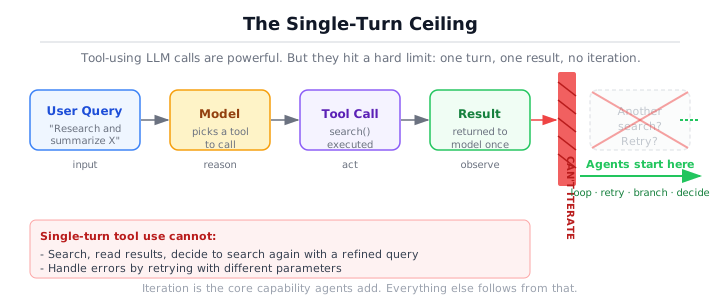
Consider a concrete example. A user asks: “What’s the population density of the country with the tallest building in the world?”
With single-turn tool use, the model can call search for “tallest building in the world.” It gets back results mentioning the Burj Khalifa in the UAE. But now what? It needs to search again for “UAE population density” and then maybe use the calculator to verify the numbers. In a single-turn system, it got one search result and had to guess the rest. In an agent loop, it would chain those three tool calls together, each informed by the previous result.
That loop is the subject of the next section.
Putting it together
You’ve gone from text-in-text-out to a system that can act: read schemas, decide, call, validate, execute, close the loop with a final answer. Every tool-using system you’ll encounter, from chatbot plugins to agent frameworks, is built on this cycle.
Key takeaways:
- System prompts are code. Version them, test them, specify precisely.
- Few-shot beats prose. Two examples constrain output more reliably than two paragraphs of instructions.
- Function calling is JSON in, JSON out. The model requests, your code fulfills. No magic on either side.
- Schema validation isn’t optional. The model will hallucinate arguments; Pydantic catches them and hands back an error the model can act on.
- Tool descriptions are selection criteria, not documentation — write for a literal reader.
- The limit is single-turn. One tool call, one result, then stop — the gap the next section closes.
The next section adds the loop that removes that ceiling: about 100 lines of Python, a while loop with an LLM inside it, and the engineering challenge of knowing when it should stop.
For a fully built tool-using assistant with proper error handling and logging, see the Tool-Using Assistant project.
Further reading
- Anthropic tool-use guide — How one provider documents the request/response contract this chapter builds by hand.
- Pydantic: Models — BaseModel, type-annotated fields, and how validation works.
- Pydantic: Error Handling — ValidationError structure and how to read it.